Most of the work inside an AI workflow is not clever. Is this WhatsApp message a booking, a price question or a complaint? Is this scanned PDF an invoice or a delivery note? Should the agent carry on, retry or ask the customer to clarify? These are small, bounded questions, and in most systems I see they are answered by sending a full prompt to a full model and parsing whatever comes back. That is slow, costly and hard to put a threshold on.
This week OpenAI shipped something aimed squarely at that problem, and I think it changes how I would design a lot of business automations.
What happened
On 22 October, OpenAI made its Decisions API generally available. It runs on GPT-6 Luna and is built for questions with bounded answers. According to OpenAI, it answers from text, images and structured inputs up to 10x faster than sending the same work to GPT-6 Luna through the Responses API.
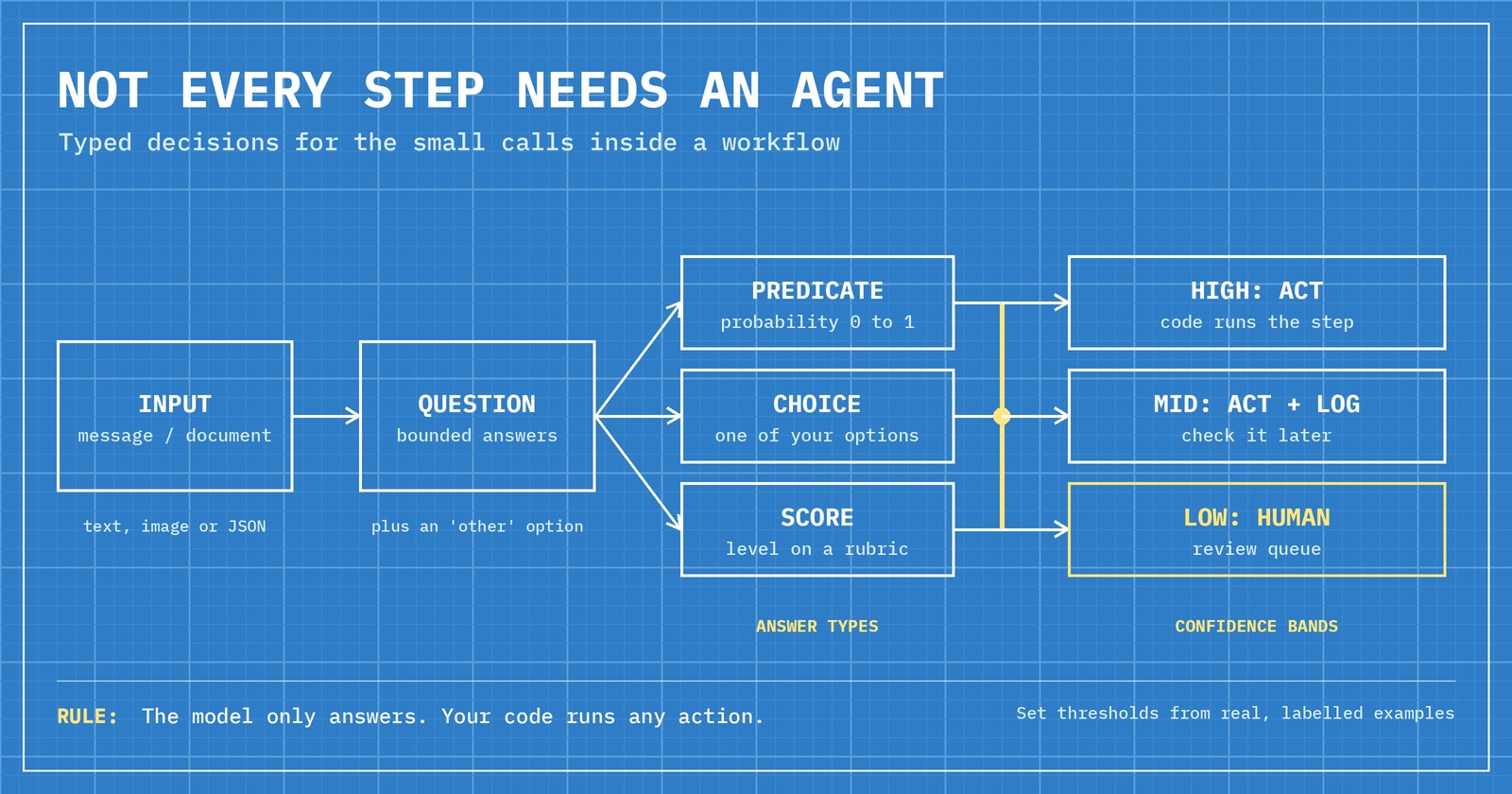
The developer guide describes three answer types:
- Predicate: the probability, from 0 to 1, that a condition is true (for example, "does this product photo show visible damage?").
- Choice: one value from a list you supply (for example, billing, technical, shipping or other), returned with probabilities and a confidence figure.
- Score: a rating against 2 to 10 ordered levels in a rubric, such as issue severity.
Since the public beta, OpenAI has added prompt caching, native JSON input, images inside question instructions, conversation history (including tool calls and their outputs) and a native GPT-Live integration for voice. You can now ask up to 400 questions in one request, up from 200. Pricing is $0.10 per million input tokens, $0.01 per million for cached input, and there is no charge for output tokens.
The customer examples in OpenAI's announcement are telling. Box says it uses the API with Box Extract to classify business documents and route them to the next step, sending lower-confidence cases to human reviewers. Datadog says it scores the risk of agent-generated shell commands before running them. Sierra says it uses it to choose the next action in live customer conversations at under 280 ms p95.
Why it matters
The interesting part is not speed. It is the shape of the answer. A free-text reply from a chat model has to be parsed, and when it says "probably billing" you have nothing to act on. A typed answer with a probability attached is something your code can branch on: above 0.9, act; between 0.6 and 0.9, act but log it; below that, hand it to a person.
That is exactly the pattern I argued for in how I build AI agents inside real business systems: the model proposes, your own code decides what is allowed to happen. A decision layer with confidence scores makes that boundary much easier to draw.
It also matters for cost. In many workflows the expensive model is being used as a sorting machine. Moving the sorting to a cheaper, typed endpoint leaves the capable model for the steps that need writing or reasoning.
Where I would put it in a real workflow
Think of a platform like the one I lead for a UK repair business, where bookings, payments, invoices and trade-ins live in one system. Here is where a decision step would earn its place:
- Inbound message triage. A WhatsApp or Instagram message arrives by webhook. A choice question sorts it into booking, repair status, quote, complaint or other. Only then does the right handler, or the right agent, pick it up. This is the kind of WhatsApp and Instagram automation I build for businesses.
- Document routing after OCR. Once a scanned file has been read, a choice question decides whether it is an invoice, a receipt or a contract, and a predicate checks whether key fields look present before anything is posted to the accounts system.
- A gate before any action. Following Datadog's example, score the risk of what an agent is about to do before it runs. High-risk actions wait for a human, which is the rule I already follow for payments, refunds and deletions.
- Agent hand-offs. The AI agent team on my own site uses a coordinator that delegates to four specialists. Picking which specialist should take a turn is a bounded choice, and exactly the kind of step this API is designed for.
Pitfalls to avoid
- Thresholds picked by feel. OpenAI's own guidance is to set thresholds using labelled examples from your application, based on what a false positive or a false negative actually costs you.
- No "other" option. The guide recommends a fallback choice when your categories do not cover every input. Without one, the model is forced into a wrong bucket.
- Ignoring refusals. The API can return a refusal instead of an answer. Your code needs a branch for it, usually the human queue.
- Using it for the wrong job. Decisions returns a probability, a choice or a score. If you need extracted fields or a written reply, OpenAI points you to Structured Outputs or function calling instead.
- Letting the answer act on its own. The guide is explicit that Decisions only returns typed answers; your application runs any actions. Keep it that way, and keep the limits outside the model, as I explained in why agent guardrails must sit where the agent cannot reach.
A short checklist before you ship one
- Pick one recurring decision your system makes many times a day.
- Write the question around observable criteria, with distinct options and an "other".
- Label a set of real examples and measure accuracy before go-live.
- Set three bands: act, act and log, send to a person.
- Log every answer with its confidence so you can retune the thresholds later.
- Review the human queue weekly; it tells you which options need rewriting.
The takeaway
Not every step in an AI workflow needs an agent. Many of them need a fast, honest answer to a narrow question, with a number attached that tells you how far to trust it. Put those steps on a decision layer, keep the expensive reasoning for the parts that need it, and keep people in the loop where the confidence is low.
If you want to see what guarded agents look like in practice, try my live AI agent demos, where every tool call and limit is shown. And if your team is still copying and sorting messages or documents by hand, tell me about the workflow you want to automate and I will come prepared.
 Mubashir HussainForward deployed engineer